




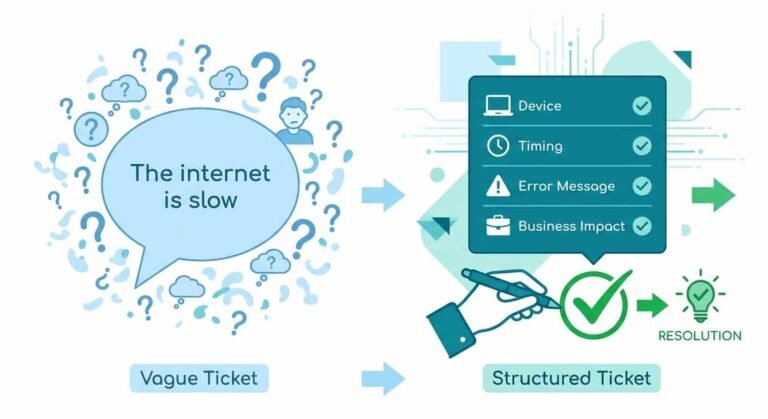
An alert is useful when it reaches someone who knows what to do next. If it goes to the wrong team or notifies everyone without assigning responsibility, response can slow down. Clear escalation rules help a network monitoring platform deliver notifications that support action.
The goal is not simply to “get alerted faster.” The real goal is to make escalation understandable, repeatable, and proportional to the problem. If a switch fails, a circuit degrades, or a dependency goes down, the team should know who owns it, what the likely impact is, and how that alert should move through the organization. Done well, escalation rules reduce wasted attention and shorten the path from detection to action.
The Real Problem: Alerts Fail When Ownership Is Undefined

Most alert fatigue does not start with volume alone. It starts with ambiguity. An alert that reaches five people at once, or reaches the wrong person first, creates work before it creates clarity. Teams then respond with broader notifications, more manual follow-up, and ad hoc coordination. That may feel safer in the moment, but it usually makes the system less reliable.
Useful escalation rules begin with one basic question: who should act first? The answer is rarely “everyone.” It is usually a specific role, a specific on-call group, or a specific tool path tied to the incident type. A good rule distinguishes between something that needs immediate human attention and something that should wait for a maintenance window, a dependency check, or a secondary review.
Separate Signal From Volume
If every issue is treated as urgent, nothing is urgent. A strong rule set should distinguish among:
- Critical service-impacting events
- Dependency-related issues that may cascade
- Routine warnings that need acknowledgment, not escalation
- Planned maintenance that should suppress unnecessary alerts
- Configuration changes that warrant review but not panic
This is where Lumics is strategically useful. Its configurable alerts can factor in device dependencies and maintenance windows, which helps teams avoid notification floods caused by predictable or downstream conditions. The point is not just fewer alerts. It is more trustworthy alerts.
Escalation Rules Should Reflect Dependency Logic, Not Just Severity Labels

Severity labels are useful, but they are not enough. Two devices can carry the same severity and still require very different responses depending on their role in the environment. A core router alert and an edge device alert may both be marked “high,” but one can affect many services while the other may affect only a narrow segment. That distinction matters.
A better approach is to tie escalation logic to dependency mapping. If an upstream component fails, alerts from dependent systems may become secondary signals rather than independent emergencies. Without that context, teams often chase the symptoms before they identify the source.
What Strong Operators Build Into Escalation Design
Teams that manage alerting well tend to think in terms of operational behavior, not just software settings. They define how an alert should move, what should suppress it, and when it should be handed off. They also review these rules regularly, because infrastructure changes, ownership shifts, and business priorities all change the meaning of an alert.
A practical escalation model usually includes:
- Clear ownership for each alert class
- A first responder path and a backup responder path
- Rules for maintenance windows and scheduled work
- Dependency-aware routing for upstream failures
- Thresholds for when escalation should move from notification to action
- Preferred delivery channels for different urgency levels
This is where Lumics fits into a mature workflow. Its alerts can route to Slack, PagerDuty, SMS, email, API, and Zapier, which gives teams flexibility in how they connect detection with response. That matters because not every event belongs in the same channel. A low-noise warning may belong in a shared workspace. A customer-impacting event may need PagerDuty or SMS immediately.
Channel Choice Is Part of the Rule
Many teams treat delivery method as an afterthought. It is part of the escalation policy. A notification in email can be appropriate for informational events. Slack can work for collaborative triage. PagerDuty or SMS may be appropriate when delay is expensive. The rule is not just “send the alert.” The rule is “send the alert where it can be acted on responsibly.”
That distinction becomes even more valuable in distributed environments, where teams may not sit together and may not share the same working hours. Just as marketers know your audience before you launch a campaign, engineering leads need to understand how each shift operates before designing alert paths. A good network monitoring platform should support those differences instead of flattening them into one generic workflow.
Maintenance Windows and Root Cause Logic Prevent False Escalations

Some of the most expensive alerting mistakes happen during planned work. A team schedules maintenance, restarts a device, or makes a configuration change, and the monitoring system reacts as if the outage were unexpected. The result is avoidable noise, duplicate work, and a loss of confidence in the alerting process.
Useful escalation rules account for maintenance windows explicitly. They also recognize that not every symptom should escalate independently when a root issue is already known. If a core dependency is down, the downstream devices may appear noisy even though they are behaving as expected under the circumstances.
How Lumics Helps Teams Keep Escalation Clean
Lumics is designed around operational clarity rather than just event volume. Its monitoring can incorporate device dependencies, scheduled maintenance, and root-cause issues into alert behavior. That makes it easier to preserve signal quality when the environment is already under stress.
It also helps that the platform keeps historical monitoring data available for the lifetime of the account, so teams can compare current alerts with previous behavior instead of relying on memory. When escalation is reviewed after the fact, historical context is often what shows whether a rule was too broad, too narrow, or simply routed incorrectly.
Escalation Rules Need Review, Not Just Setup
A common mistake is to treat alerting as a one-time configuration project. In reality, escalation rules are living operational policy—much like a well-maintained due diligence data room that must stay current as an organization evolves. They should be reviewed after incidents, after network changes, and after any major ownership shift. What made sense when a team was small may become brittle once responsibilities are distributed across more people or more sites.
Use Incident Reviews to Tighten the Rules
Post-incident review should not only ask what failed. It should ask how the alert reached the team, whether it reached the right owner first, and whether it should have been suppressed, delayed, or enriched with more context. If an event triggered too early, the threshold may be wrong. If it triggered too widely, the routing may be wrong. If it triggered too late, the dependency model may be incomplete.
This kind of review process turns alerting from a reactive habit into an operational discipline. That is especially important for teams using a network monitoring platform across multiple systems, where the cost of a bad escalation compounds quickly.
The Best Escalation Rules Make Work Easier, Not Just Faster
The strongest alerting systems do more than accelerate response. They reduce unnecessary decisions. That is the real benefit of useful escalation design. When the rules are clear, the team does not waste time asking whether the issue is real, who owns it, or whether maintenance explains the symptom. The alert itself already provides that context.
Lumics combines real-time visibility with configurable alerting and dependency-aware context. It does not replace the need for disciplined ownership or good incident habits. It supports them. Tools can route alerts, but teams still have to define what deserves attention and what deserves suppression.
A thoughtful escalation framework creates consistency across responders, channels, and time zones. It lowers noise without lowering standards. It also makes it easier for the team to trust the system when it really matters.
If your goal is to make alerting more actionable, not just more active, start by tightening ownership, dependency logic, and maintenance handling together. Then use Lumics to turn those rules into a workflow the whole team can rely on.









One thought on “Building Useful Network Alert Escalation Rules Across a Team”